Anyone who edits photos knows the feeling: you remove a small spot, stray hair or distracting object, then realize the tool also wiped out part of the image you actually wanted to keep.
Adobe is trying to make that less frustrating with Camera Raw 18.5.
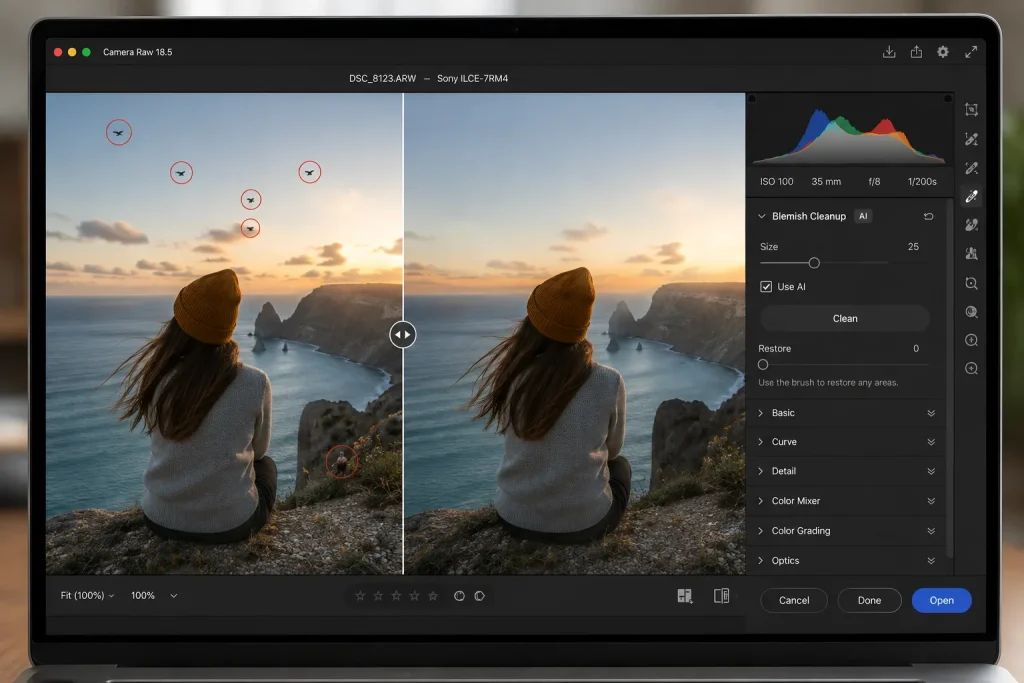
The latest update introduces an AI-assisted blemish cleanup tool designed to handle small imperfections with less manual work. Users can select unwanted areas in a photo, and Camera Raw analyzes the surrounding image to fill them in more naturally.
That could be useful for everyday fixes such as skin blemishes, dust spots, small background distractions or other details that take attention away from the shot.
The more interesting part, though, is the added control after the cleanup is done.
If the tool removes too much, users can restore parts of the original image point by point instead of starting the entire edit again. That means a photographer could clean up a small area, notice that an important texture or facial detail disappeared, and bring just that detail back.
For people who spend a lot of time retouching portraits, product photos or travel shots, that kind of control can save time. Small mistakes often lead to repeated undoing, repainting and adjusting. A more precise restore option makes the process feel less all-or-nothing.
The feature is not meant to replace careful editing. Complicated backgrounds, hair, fabric, architecture and fine textures can still require a closer look. Automated cleanup may produce a good first result, but photographers will still want to check the image at full size.
That is becoming a familiar pattern in modern photo software. AI is increasingly handling the repetitive parts of editing, while the person behind the screen decides what should stay, what should go and what still needs a human touch.
For Camera Raw users, version 18.5 is less about a dramatic new effect and more about making everyday retouching quicker — while giving people a little more room to fix the tool when it gets something wrong.