ElevenLabs

4.50
Top-tier AI voice generation that sounds so natural, it’s hard to tell whether it’s AI or a real person.
Advertisement 728 × 90
CompanyElevenLabs
CategoryAI Voice
Released2022-01
Updated2026-08-17

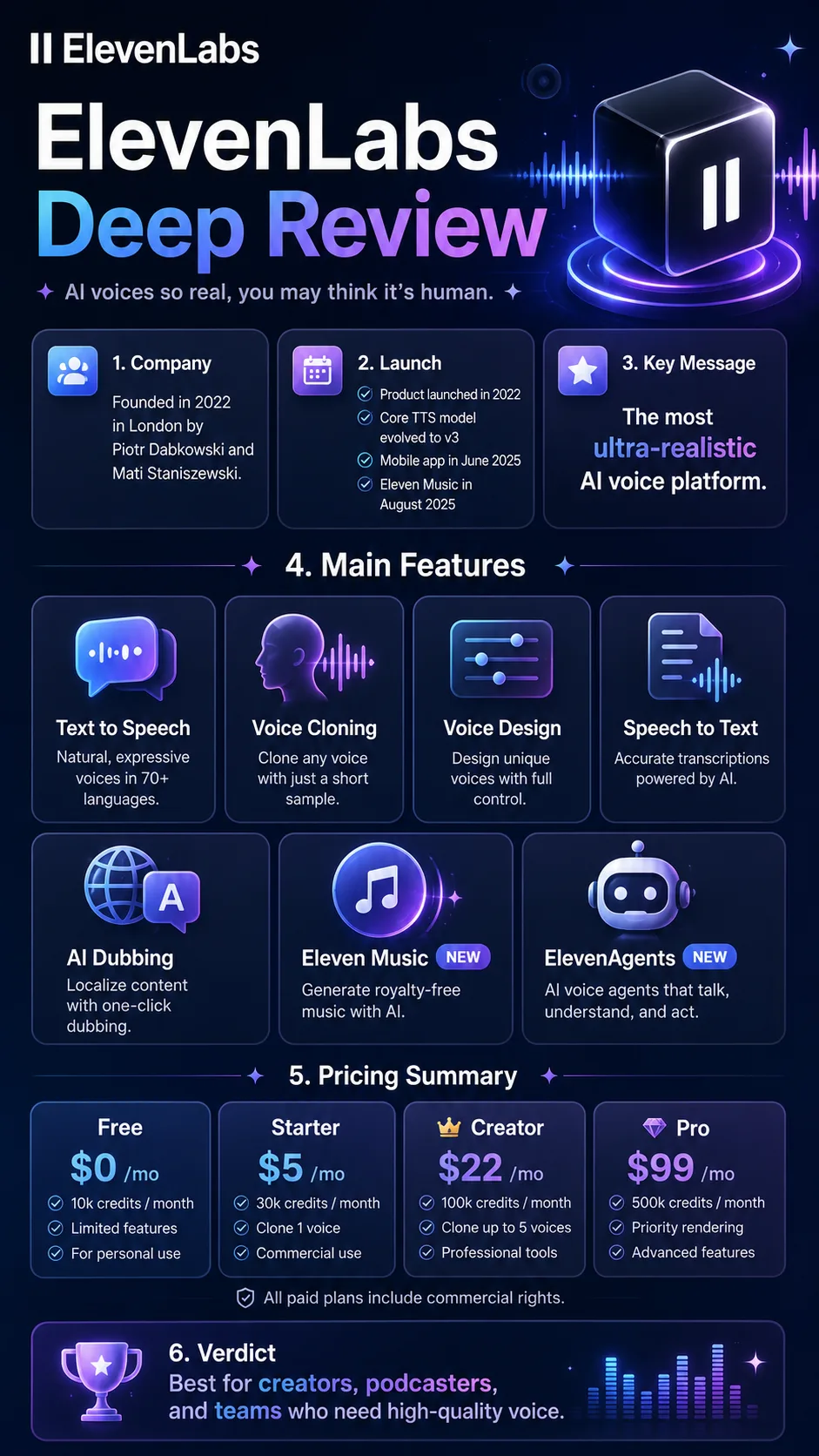
ElevenLabs One picture says it all.

ElevenLabs

ElevenLabs Overview

ElevenLabs’ core product is still Text to Speech.

But over the past few years, its product lineup has expanded significantly.

Beyond TTS, it now offers voice cloning, multilingual dubbing, speech-to-text, AI music, and AI voice agents for customer support and sales.

Voice cloning can create a digital voice from a short audio sample.

Its dubbing tools can translate an original video into other languages while trying to preserve the original speaker’s voice and emotion.

The Scribe family handles speech-to-text transcription.

Technically, ElevenLabs uses deep learning models to reproduce subtle details in human speech, including intonation, pauses, breathing, and emotional variation.

The company has long emphasized that its generated voices can sound “close to human.”

From my own experience, that claim doesn’t feel particularly exaggerated.

As of 2026, ElevenLabs supports more than 70 languages and offers over 10,000 preset voices.

In May 2026, the company also cut pricing for its API and Agent products, with some items dropping by as much as 55%.

ElevenLabs Pricing

PlanPriceDescription
Free $0 Includes core TTS features but no commercial license, making it suitable for testing and trying out the service.
Starter $6/mo Includes a commercial license and instant voice cloning, suitable for light-use creators.
Creator $22/mo Supports professional voice cloning, higher audio quality, and Dubbing Studio, making it suitable for professional creators.
Pro $99/mo Includes analytics dashboards and high-fidelity audio output via API, suitable for growing teams.
Scale $299/mo Includes 3 collaboration seats, multi-user management, and priority support.
Business $990/mo Includes 5 collaboration seats, ultra-low-latency TTS, SSO, and custom integrations.
Enterprise Custom Includes an SLA, a dedicated account manager, and additional enterprise-grade features.

ElevenLabs uses a credit-based system.

Each subscription gives you a set number of Credits every month, and features like text-to-speech, voice cloning, and dubbing all draw from that balance.

The main differences between plans are the number of Credits, audio quality, voice cloning capabilities, and team features.

If you just want to try ElevenLabs, Free is enough.

If you plan to use it commercially, Starter is really the entry point.

For individual content creators, I think Creator is the plan worth looking at most closely. It gives you more Credits and unlocks professional voice cloning, which makes it much more practical for people who regularly produce videos, podcasts, or voiceovers.

Once you move up to Pro and above, the plans are much more clearly aimed at teams and heavy API usage.

Before choosing a plan, I’d think about two things.

First, whether the generated content needs to be used commercially.

Second, roughly how many minutes of audio you expect to generate each month.

If you only make an occasional video, there’s no reason to buy a high-tier plan.

If you’re producing voiceovers in bulk every week, the number of Credits quickly becomes more important than the headline monthly price.

Important: Annual billing works out to roughly paying for 10 months and getting 12. On paid plans, unused Credits can roll over into the next month, up to twice your monthly allowance, while Free does not support rollover.

Since May 2026, paid users can also continue with PAYG usage after reaching their included allowance, so you don’t necessarily have to upgrade to a higher plan.

ElevenLabs Key Features

  1. Text to Speech
    Enter your text, choose a voice and model, and generate speech directly. It supports more than 70 languages and over 10,000 preset voices, with controls for stability, clarity, speaking speed, and style.
    This is the feature I use most because the workflow is so simple and requires almost no learning curve.
  2. Voice Cloning
    Upload a voice sample, and ElevenLabs can generate a digital voice that sounds close to the original.
    Instant Voice Cloning is designed for quick cloning and is available from Starter and above. Professional Voice Cloning requires longer, cleaner recordings and is available from Creator and above.
    The difference in quality is noticeable, and the professional option is clearly better suited to long-term, serious use.
  3. Voice Design
    You don’t need a real human voice sample to create a new voice. You can simply describe the voice you want in text.
    For example: “40 years old, British accent, rich baritone, warm but authoritative.” The system will generate a new synthetic voice based on that description. It’s also available on the Free plan.
  4. Speech to Text
    Scribe v2 supports more than 90 languages, with real-time transcription, timestamps, and speaker labeling.
    If you already do your audio work inside ElevenLabs, this can save you from switching to another tool just for transcription.
  5. AI Dubbing
    It can translate video or audio into other languages while trying to preserve the original speaker’s voice, emotion, and pacing.
    For creators producing multilingual video, this can be much more valuable than simply generating a separate voiceover.
  6. Eleven Music
    Launched in August 2025, Eleven Music is an AI music generation service. You can generate complete songs from text prompts and specify styles or genres.
    It goes beyond traditional speech synthesis, but it shows how ElevenLabs is expanding into a broader AI audio platform.
  7. ElevenAgents
    ElevenAgents lets you build AI voice assistants that can talk with people in real time for use cases like customer support, sales, and appointment booking.
    They can also call APIs and external tools, so they don’t just “talk” — they can continue carrying out tasks based on the conversation.

ElevenLabs Editorial Review

I used ElevenLabs continuously for three weeks.

I mainly tested three things: podcast intros, training video voiceovers, and voice cloning.

The voice quality is honestly a little ridiculous

The first time I generated something, I listened to it several times.

There were no obvious stutters, and it didn’t have that old-school AI voice problem where every word feels equally stressed.

It pauses naturally between sentences, puts a little more emphasis on important words, and even raises the intonation at the end of questions in a believable way.

I also played some generated clips for a few coworkers without telling them what they were.

All three thought they were listening to a real person.

If I had to score it out of 10, I’d give it a 9.5.

The remaining 0.5 mostly comes down to small details in Chinese.

It can still mispronounce certain polyphonic characters, and the intonation on some words occasionally feels a little off.

But it doesn’t happen every time.

For most normal voiceover use cases, if you don’t tell people it’s AI, I think a lot of them genuinely won’t notice.

It’s almost effortless to get started

Once you sign up, you go into the Playground, choose a voice, paste in your text, and hit Generate.

A few seconds later, you have audio.

If all you want is a quick voiceover, you can understand the basic workflow in under five minutes.

Getting the voice to sound really good is a different story, though.

Stability, clarity, speaking speed, and style strength all have a noticeable effect on the result.

I spent quite a bit of time tweaking those settings at first.

Sometimes changing stability just a little can completely change how the whole passage feels.

Credits disappeared faster than I expected

I ran into this pretty quickly.

If you generate something, don’t like it, and regenerate, you’re spending Credits again.

At first, I kept comparing different voices and parameter settings, generating more than a dozen versions in a row.

The 10,000 Credits on the Free plan disappeared fast.

After that, I changed how I worked.

I first use the default settings to make sure the text itself is correct. Once I’ve settled on the voice and style, I generate the final version.

That saves a lot of Credits.

Professional Voice Cloning isn’t as casual as I expected

I originally assumed a few minutes of recording would be enough.

Once I actually tried it, I realized that if you want Professional Voice Cloning to sound good, both recording quality and the amount of source material matter a lot.

I’d recommend preparing around 30 minutes to 3 hours of clean audio, ideally with different emotions, speaking speeds, and sentence structures.

The first time, I cut corners and only provided about five minutes.

The result definitely sounded like me, but it wasn’t very stable.

Some words drifted slightly, and longer sentences didn’t sound completely natural.

So the feature isn’t bad.

It just requires proper source material.

Chinese accents still have some small issues

Chinese overall is already very good, but the details aren’t perfect.

I tried a Taiwanese accent, and a few words still leaned toward standard Mandarin pronunciation.

For everyday content, that usually doesn’t matter much.

But for projects with strict localization requirements—brand ads or regional dubbing, for example—you may still need manual correction.

Pros

The voice quality is excellent.
Naturalness, breathing, emphasis, and emotional delivery are all top-tier. This is the main reason ElevenLabs is worth paying for.

It’s extremely easy to use.
You don’t need audio expertise. Basic voiceover generation has almost no learning curve.

The voice feature set is very complete.
TTS, cloning, dubbing, STT, music, and Agents are all part of the same platform.

Broad language coverage.
More than 70 TTS languages and 90+ STT languages make it especially useful for multilingual content teams.

API pricing is getting cheaper.
After the May 2026 price cuts, it became more attractive for developers and high-volume API usage.

Cons

Heavy usage isn’t cheap.
Pricing rises quickly as you move into Pro, Scale, and Business. If you’re producing content at volume, calculate usage first.

Chinese details aren’t completely reliable yet.
Polyphonic characters, regional accents, and certain pronunciation patterns can still cause problems.

Trial and error burns Credits quickly.
Regenerating, switching voices, and tweaking parameters all consume your allowance.

Professional cloning needs proper source material.
For truly natural results, clean and sufficient recordings matter. A few spoken sentences won’t get you the best possible quality.

Who it’s good for

Content creators and podcasters

If you need voiceovers, intros, or ad reads without hiring a human voice actor every time, ElevenLabs is extremely convenient.

Video production teams and marketers

For training videos, product demos, and ads that need quick multilingual versions, it can save a lot of studio booking and scheduling time.

Audiobook and course creators

You can keep the same voice across long-form content, and when something needs changing, you can edit the text and regenerate instead of recording the whole section again.

Developers who need voice capabilities

The API is responsive and fairly easy to integrate, making it suitable for customer support, voice assistants, game NPCs, and similar products.

People at risk of losing their voice, or who have already lost it

Through its Impact Program, ElevenLabs provides free voice cloning support for people with permanent speech loss, helping them preserve their own voice.

Who it’s not ideal for

People who only want transcription

If your only goal is turning meeting recordings into text, a dedicated transcription tool is usually simpler and may be cheaper.

Individuals or small teams with very limited budgets

Free is enough to experiment, but once you move into regular commercial use, you’ll likely need a paid plan fairly quickly.

Projects that require very precise regional Chinese accents

If you need an exact dialect or regional accent, human voice talent is still more reliable.

People who are especially concerned about voice misuse

Voice cloning comes with abuse risks. If that matters to you, it’s worth reviewing the platform’s policies and consent requirements before using it.


Summary

After using ElevenLabs, the thing that stood out most to me was still the voice quality.

It was the first time I felt AI voice had moved beyond simply “sounding pretty natural.”

Some outputs genuinely sound like real recordings.

If you regularly produce videos, podcasts, courses, or multilingual content, it can save a substantial amount of time on recording and re-recording.

That said, it’s not a “pick a plan and never think about usage again” kind of service.

Credits keep getting used up as you experiment and regenerate, and Professional Voice Cloning requires properly prepared source material if you want the best results.

If you’re just curious, Free is enough.

If you need commercial use, Starter is a reasonable place to begin.

If you’re already producing content consistently, I’d lean toward Creator.

Once you move into Pro and above, the decision becomes less about how good the voice sounds and more about usage volume, team collaboration, and API costs.

Comments (0)

Leave a comment

Advertisement 728 × 90

Similar Tools

DittoDub
88
A video localization platform built for YouTube creators. It can translate, dub, and publish videos in multiple languages while preserving the creator’s original tone and delivery as much as possible.
AI Voice
Adobe Speech Enhancer
57
An online AI voice enhancement tool. Upload a recording, and it automatically reduces background noise and echo to make speech sound clearer.
AI Voice
Voice.ai
50
Voice.ai is a real-time AI voice changer and voice cloning tool. It can transform your voice into different tones for gaming, livestreaming, voice chat, and similar use cases.
AI Voice
UniScribe
43
an AI-powered audio and video transcription tool that converts recordings, videos, and YouTube content into editable text automatically.
AI VideoAI Voice
Wispr Flow
40
A system-wide AI voice input tool that turns spoken language into polished, usable text. It supports global input across different apps and text fields.
AI Voice
Easy-Peasy.AI
40
A multimodal content platform that combines AI writing, image generation, voice, digital-avatar video, transcription, and automated workflows.
AI WorkflowAI VideoAI OfficeAI DesignAI VoiceAI ChatAI art
Verbatik
30
An AI content platform that combines TTS, voice cloning, Voice Design, digital-avatar video, music, and image generation, with API and MCP integration also available.
AI Voice
Revocalize AI
24
An AI voice-conversion tool designed for music production. It can change a vocal recording’s tone and includes features such as pitch correction, harmony generation, and custom voice training.
AI VoiceAI Music