n8n

4.65
An open-source automation tool that connects AI, SaaS apps, databases, and code into end-to-end workflows. You can use it in the cloud or self-host it on your own infrastructure.
Advertisement 728 × 90
Companyn8n GmbH
CategoryAI Workflow
Released2019-06
Updated2026-08-20

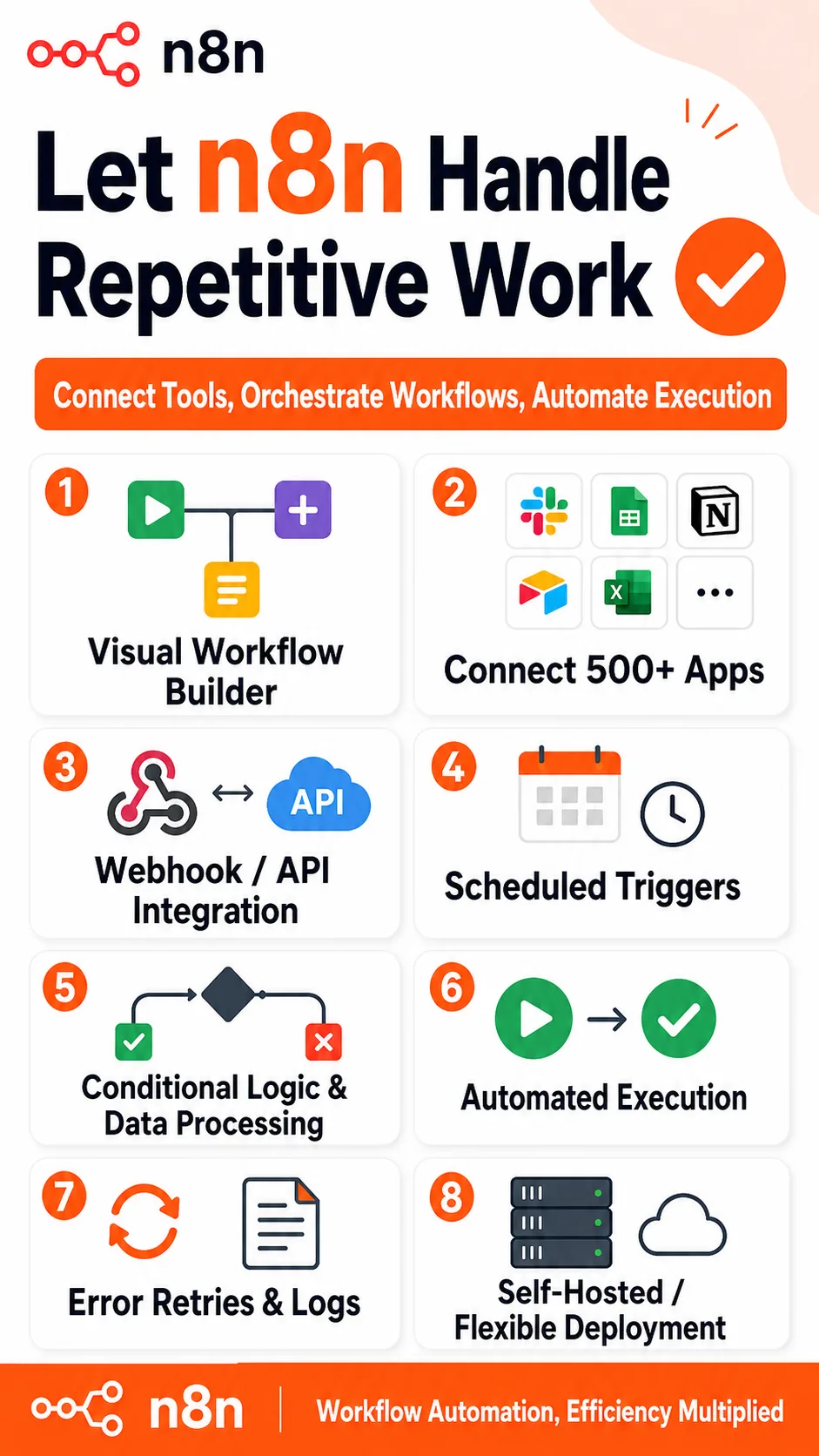
n8n One picture says it all.

n8n

n8n Overview

n8n is an open-source workflow automation platform.

The basic idea is similar to Zapier or Make: connect services such as Google Sheets, Slack, email, and databases, then let data and actions move automatically through a predefined workflow.

What really sets n8n apart is its programmability and support for AI workflows.

You can add models from OpenAI, Anthropic, Google, and others directly as nodes in a workflow, then connect them to tools such as search, databases, email, and HTTP APIs.

That makes it possible to build AI agents that can make decisions, call tools, use the results, and continue executing the workflow.

For example, when a customer email arrives, AI can first identify the intent, look up the customer in your CRM, and draft a reply. If the message is clearly negative, the workflow can automatically alert the sales owner.

All of those steps can live inside the same visual workflow.

n8n also supports self-hosting.

Deploy it on your own server, and you can keep control over your data, credentials, and execution environment.

That level of control is one of the main reasons many technical teams choose n8n.

n8n Pricing

PlanPriceDescription
Community Edition (Self-hosted) $0 Includes the core features and is best suited for developers, individuals, and small teams with the ability to manage their own infrastructure.
Starter (Cloud) $24/mo An entry-level cloud plan. Best for individuals and lightweight automation.
Pro (Cloud) $60/mo Offers higher concurrency and more team features. Best suited for small production environments.
Business (Self-hosted) $800/mo Adds SSO, Git integration, multiple environments, and advanced administration features.
Enterprise (Cloud or Self-hosted) Custom Designed for large organizations, with advanced security, compliance, and SLA support.

n8n mainly comes in two flavors: Cloud and Self-hosted.

In recent years, its pricing has increasingly focused on the number of workflow executions. In general, one complete run of a workflow counts as one execution, rather than charging based on how many nodes are inside it.

The biggest appeal of the Community Edition is its flexibility.

The software itself doesn’t require a subscription, but you’re responsible for your own server, database, backups, security updates, and any AI model API costs.

For individuals or small teams with someone comfortable using Docker, self-hosting can be very cost-effective.

If you don’t want to deal with infrastructure or maintenance at all, Cloud will save you a lot of time.

n8n Key Features

  1. Visual workflows
    Build automations by dragging, dropping, and connecting nodes. Triggers, conditions, data processing, and execution results are all visible in the same workflow.
  2. Extensive app integrations
    n8n includes hundreds of built-in nodes for services such as Slack, Google Sheets, GitHub, Notion, and databases. If there’s no dedicated node, you can still connect to a service through its API using HTTP Request.
  3. AI Agents
    Use a large language model as the “brain” of a workflow, then give it access to tools such as search, databases, email, and code. The agent can decide what action to take next based on the task.
  4. Code nodes
    Beyond the visual workflow builder, you can insert JavaScript or Python directly for more complex data processing and custom logic.
  5. Self-hosting
    n8n supports deployment with Docker, Kubernetes, and other setups, making it a good fit for teams that want direct control over their data, credentials, and runtime environment.
  6. Debugging and execution logs
    You can inspect the input, output, and errors at each step, and rerun individual nodes when needed. That makes troubleshooting much more visual than working with traditional scripts.
  7. Webhooks and scheduled workflows
    Workflows can be triggered through APIs, webhooks, schedules, or external events, making n8n well suited for long-running, unattended automations.

n8n Editorial Review

I’ve used n8n for everything from simple scheduled tasks to more involved AI Agent workflows.

My biggest takeaway is this: it really is flexible, but that flexibility comes with a bit of technical overhead.

Easy to start, a little more work to self-host

If you use n8n Cloud, you can sign up and get started right away.

The real learning curve starts with self-hosting.

It helps to understand at least the basics of Docker, environment variables, domains, and databases. As workflows become more complex, it also becomes difficult to avoid JSON, APIs, and a little code entirely.

That said, day-to-day work doesn’t feel like traditional programming.

Most of the time, you’re still dragging nodes onto a canvas, connecting them, and inspecting the data flowing through the workflow. There are also plenty of templates, so beginners can often start from an existing workflow and modify it rather than building everything from scratch.

AI workflows are the most interesting part right now

I built a simple social-monitoring workflow:

collect keywords from social platforms → let AI classify the content and sentiment → detect negative mentions → send an alert to a group chat → automatically create a follow-up task.

You could obviously build the same thing with traditional code.

The advantage of n8n is that the entire logic is visible on the canvas.

If something breaks, you can click into that step and immediately inspect its input and output.

If you later want to add a database or switch to a different AI model, you don’t need to rebuild the entire system.

That’s what makes n8n more interesting than a typical automation tool: you can build with low-code blocks without completely boxing in advanced users.

A few practical issues

First, AI Agents can be a little too eager to “think for themselves.”

If you don’t give the model clear system instructions and strict tool boundaries, it may simply invent an answer instead of actually querying a database or calling an API.

So the hard part of building AI workflows isn’t just connecting nodes. You also need to define:

  • which information must come from tools
  • which actions the agent is allowed to execute automatically
  • when human approval is required
  • what counts as successful task completion

Without those constraints, a workflow can look intelligent while still being unreliable.

Second, self-hosted and free does not mean cost-free.

You still have to maintain the server, back up the database, install upgrades, manage certificates, security, and monitoring.

That may be manageable for a personal project, but in an enterprise environment, those responsibilities cannot be ignored.

Third, I wouldn’t blindly upgrade production to every new release.

n8n moves quickly.

Frequent updates are great for getting new features, but node behavior and configuration can also change. A workflow that has been running reliably for months may occasionally hit compatibility issues after an upgrade.

For important environments, test first and upgrade afterward.

Pros and cons

Pros

  • Open source and self-hostable. Very attractive if you care about keeping control of your data.
  • Strong AI orchestration. LLMs, tool calls, and traditional automation can all live inside the same workflow.
  • Highly flexible. Visual nodes, APIs, and code can be mixed together, so you’re less likely to hit a hard ceiling.
  • Easy to debug. You can inspect the data at every step, which makes complex automation much easier to troubleshoot.
  • Developer-friendly. APIs, webhooks, code nodes, and deployment options are all relatively open.

Cons

  • The learning curve is steeper than Zapier. Especially once self-hosting and complex data processing are involved.
  • You’re responsible for operations. The Community Edition removes the subscription fee, not the infrastructure work.
  • It doesn’t have the largest library of native integrations. Some long-tail SaaS tools may require direct API calls.
  • High-frequency usage on commercial plans needs careful costing. The more often workflows run, the more important execution limits become.
  • AI Agents need guardrails. Without clear permissions and tool boundaries, incorrect calls and hallucinations become much more likely.

Best for / Not ideal for

Best for:

  • Developers and technical teams. Especially those looking for a programmable, self-hostable automation platform.
  • AI Agent developers. Useful when you need to connect models, tools, databases, and real business processes.
  • SaaS companies and small-to-mid-sized teams. Good for automating repetitive backend and operational workflows quickly.
  • Data-sensitive organizations. A strong fit if you want workflows and data to remain on your own infrastructure.
  • Anyone tired of writing glue code by hand. A lot of API integration work is much easier to understand visually in n8n.

Not ideal for:

  • People who want zero technical setup. For very simple automations, Zapier or Make will usually be easier.
  • Anyone unwilling to maintain servers. The flexibility of self-hosting comes with operational overhead.
  • Teams that depend heavily on native integrations for niche SaaS tools. Some services may still require custom API work.
  • People who only need one or two basic automations. If your needs are very light, n8n may simply be more platform than you need.


Summary

The most compelling thing about n8n isn’t simply that it has a lot of automation features. It’s that it doesn’t force you to work in only one way.

For simple workflows, drag and connect nodes.

When things get more complex, call an API.

If that still isn’t enough, write your own code.

Now with AI Agents added to the mix, n8n is gradually evolving from a traditional automation tool into a general-purpose workflow orchestration platform.

Of course, more flexibility also means more responsibility.

Deployment, permissions, debugging, and model behavior are all things you still need to manage yourself rather than leaving everything to the platform.

If all you need is a workflow that says, “when an email arrives, add it to a spreadsheet,” there are simpler tools.

But if you want to build and maintain your own long-term automation and AI workflow stack, n8n has a very high ceiling.

Comments (0)

Leave a comment

Advertisement 728 × 90

Similar Tools