NotebookLM

4.50
Google’s “AI study companion” can now turn your source material into a podcast.
Advertisement 728 × 90
CompanyGoogle
CategoryAI Workflow
Released2023-12
Updated2026-08-18

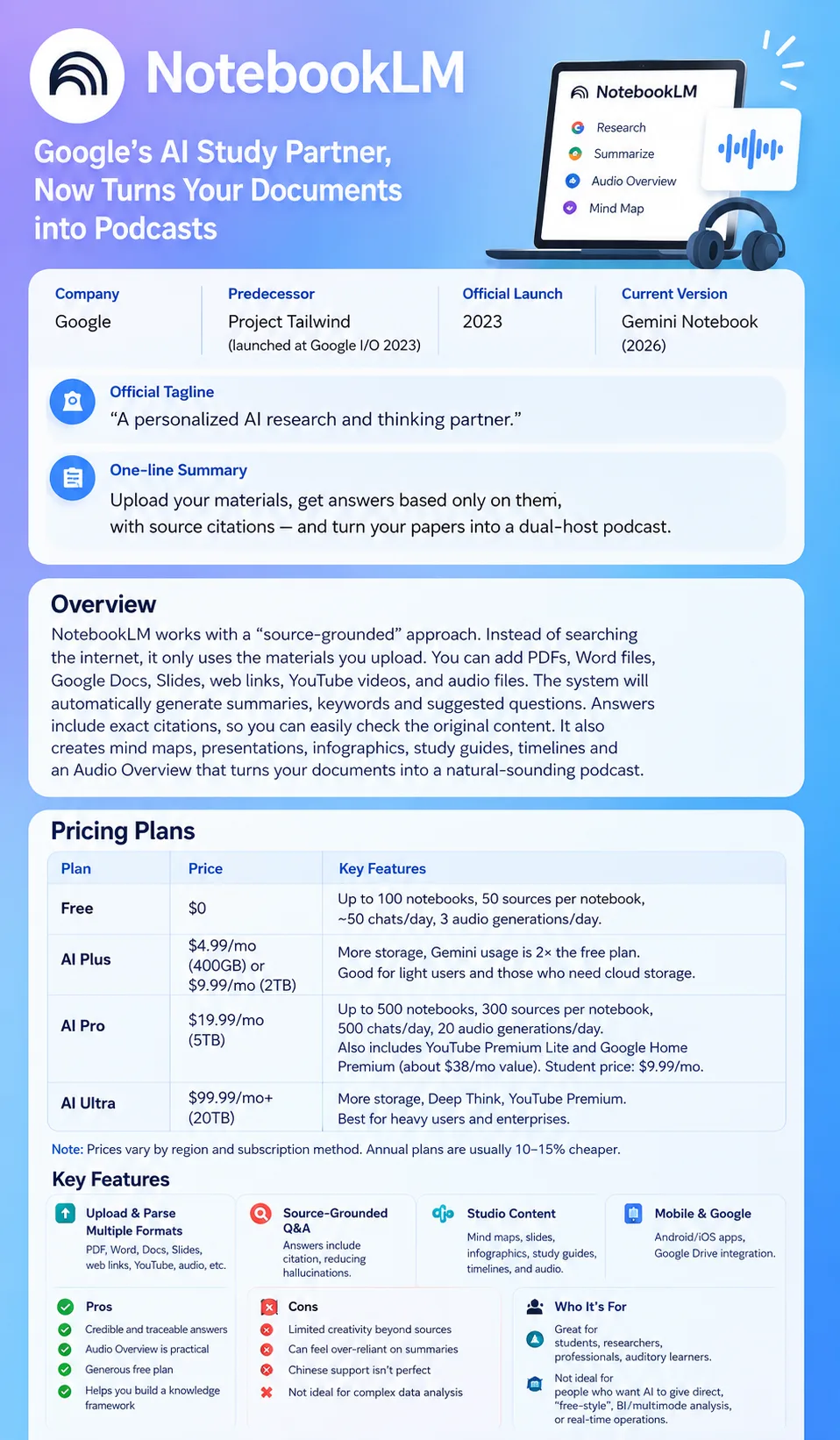
NotebookLM One picture says it all.

NotebookLM

NotebookLM Overview

The core idea behind NotebookLM is source grounding: it works around the materials you give it.

You can upload PDFs, Word documents, Google Docs, Slides, web pages, YouTube links, and audio files. NotebookLM reads them and automatically pulls together summaries, key topics, and suggested questions.

Once your sources are loaded, you can ask questions about them and get answers with citations back to the original material.

That makes the answers much easier to verify than responses from a general-purpose AI relying mainly on what the model already knows, and it helps reduce the problems caused by hallucinations.

NotebookLM also does more than Q&A.

It can reorganize your sources into mind maps, study guides, timelines, presentation content, and infographics.

Its most distinctive feature is still Audio Overview.

It can turn a long document into a podcast-style conversation between two AI hosts, making it easy to get through the main points while commuting or doing something else.

NotebookLM Pricing

PlanPriceDescription
Free $0/mo Create up to 100 notebooks, with up to 50 sources in each. Includes around 50 chat interactions and 3 Audio Overview generations per day.
Plus $4.99/mo(400GB)or $4.99/mo(2TB) Includes more cloud storage and roughly twice the Gemini usage limits of the free plan. A good fit for light AI use and people who also need extra storage.
Pro $19.99/mo(5TB) Unlocks NotebookLM Plus, with up to 500 notebooks and 300 sources per notebook. Includes around 500 chat interactions and 20 Audio Overview generations per day, plus additional benefits across other Google services.
Ultra $99.99/mo(20TB) Includes higher storage limits and advanced AI capabilities such as Deep Think. Best suited for heavy users and more demanding business or enterprise needs.

NotebookLM itself isn’t sold as a separate subscription. Its advanced features are bundled into Google’s AI plans.

When you upgrade, you’re not just getting more NotebookLM usage — you also get benefits such as higher Gemini limits and additional cloud storage.

Pricing, storage, and included perks vary by region, and annual billing is usually cheaper than paying month to month.

Free is already enough for most students and occasional research.
AI Plus is better suited to lighter AI use combined with extra cloud storage.
If you use NotebookLM heavily, AI Pro offers much more practical limits.
Ultra has a much higher entry price and is mainly aimed at heavy AI users and people who need large amounts of storage.

NotebookLM Key Features

  1. Import from multiple source types
    NotebookLM supports PDFs, Word files, Google Docs, Slides, web pages, YouTube, audio, and more. Once added, the content is automatically processed and organized.
  2. Source-grounded Q&A
    Ask questions about your materials and the answers include citations back to the original sources. You can jump directly to the source text to verify the answer, which makes the AI’s reasoning easier to trace.
  3. Content generation in Studio
    Your sources can be turned into mind maps, study guides, timelines, presentation content, and infographics. Audio Overview can also generate podcast-style conversations between two AI hosts.
  4. Search and source discovery
    You don’t have to upload everything manually. NotebookLM can also search for public sources around a topic and add relevant material to the current notebook for further analysis.
  5. Mobile apps and Google integration
    NotebookLM is available on Android and iOS, and it can work directly with files stored in Google Drive, reducing the need to repeatedly download and re-upload documents.

NotebookLM Editorial Review

I’ve been using NotebookLM since Audio Overview started getting attention in 2024. These days, whenever I have a long document to get through, I often drop it into NotebookLM first.

Ease of use: very low friction.

Create a notebook, add a PDF or a URL, and you can start right away. It automatically gives you a summary and suggested questions, so there’s very little need to think about prompt engineering.

What it’s actually like to use:

Audio Overview is still the standout feature.

I uploaded a research paper of around 20 pages, and a few minutes later it generated a roughly 10-minute conversation. Two AI hosts took turns explaining the content, pausing, responding to each other, and occasionally sounding surprisingly natural.

It’s much easier to listen to than plain text-to-speech.

Of course, it doesn’t replace reading the paper.

But it’s very useful as a first pass: you can quickly get the research question, main arguments, and conclusion straight in your head, then decide which sections are actually worth reading closely.

A few issues came up in practice:

  1. Chinese sources can be inconsistent
    Some Chinese web pages and YouTube content fail to parse, especially when the page structure is complicated. In those cases, converting the content to PDF and uploading it is often easier.
  2. It’s conservative outside your sources
    If the answer isn’t in the material you provided, NotebookLM will often simply tell you that the sources don’t contain it. That’s a strength for rigorous research, but less useful when you want the AI to explore more freely.
  3. Chinese infographics can have layout problems
    With a lot of content, you may see overlapping text, garbled characters, or odd font sizing. It’s usually fine for personal reference, but not always something you’d want to share directly.
  4. It can make you feel like you learned more than you actually did
    Summaries, mind maps, and podcast-style audio can all be generated in minutes. But understanding those outputs isn’t the same as understanding the original source. NotebookLM is excellent for building a framework first; real understanding still means going back to the material.

What works well

  • Answers are traceable. Citations point back to the original source, so verification is easy.
  • Audio Overview is genuinely useful. Long documents become something you can listen to while commuting or walking.
  • The free tier is generous enough. Most individual users won’t need to pay right away.
  • It’s efficient with long material. Papers, reports, and course materials can be broken down into structure and key points very quickly.

What doesn’t work as well

  • It isn’t great at open-ended exploration. It doesn’t naturally go far beyond the material you give it.
  • It can encourage overreliance on summaries. If you only consume AI-generated notes, it becomes easy to skip the reading and thinking.
  • Chinese support can still be inconsistent. Web parsing and infographic layout have room to improve.
  • Complex tables and image analysis aren’t its strength. Its biggest advantage is still working with documents and knowledge-heavy source material.

Best for

Students and researchers

Useful for organizing papers, course materials, lecture recordings, and revision notes.

Professionals who need to get up to speed on unfamiliar topics

It can save a lot of time when doing competitor research, industry research, or reading technical documentation.

People who prefer listening to content

It lets you move material that normally requires focused reading into commuting, walking, or workout time.

Not ideal for

People who just want AI to give them the answer

NotebookLM is good at organizing information and helping you understand it, but it doesn’t replace actual learning.

People focused on complex data analysis

If your main work involves Excel, structured datasets, or specialized image analysis, this probably isn’t the right tool.

People who want a lot of free-form brainstorming

If you want AI to move beyond the source material and explore ideas freely, a general-purpose chat model will usually feel more natural.


Summary

The most useful thing about NotebookLM isn’t that it thinks for you. It’s that it cleans up the pile of information in front of you before you start thinking.

Whether it’s a 30-page paper, a collection of web pages, or a stack of course materials, you can let NotebookLM pull out the key points and show where they came from. Then you can decide what’s actually worth reading in detail.

Audio Overview adds another useful layer by turning material that you would normally have to read into something you can listen to.

But reading the summary or finishing the podcast doesn’t mean you’ve mastered the material.

NotebookLM can save you the time it takes to organize information. Understanding it, evaluating it, and deciding what matters are still your job.

If you regularly work with research papers, reports, course materials, or long documents, NotebookLM is a strong tool for that first round of整理 and triage. The free version is also more than enough to try it out first.

The hands-on sections of this article are based on the free version of NotebookLM and publicly available information as of August 2026. Pricing and specific features are subject to the latest official information.

Comments (0)

Leave a comment

Advertisement 728 × 90

Similar Tools

Related Models

Related News