LogoAI

2.50
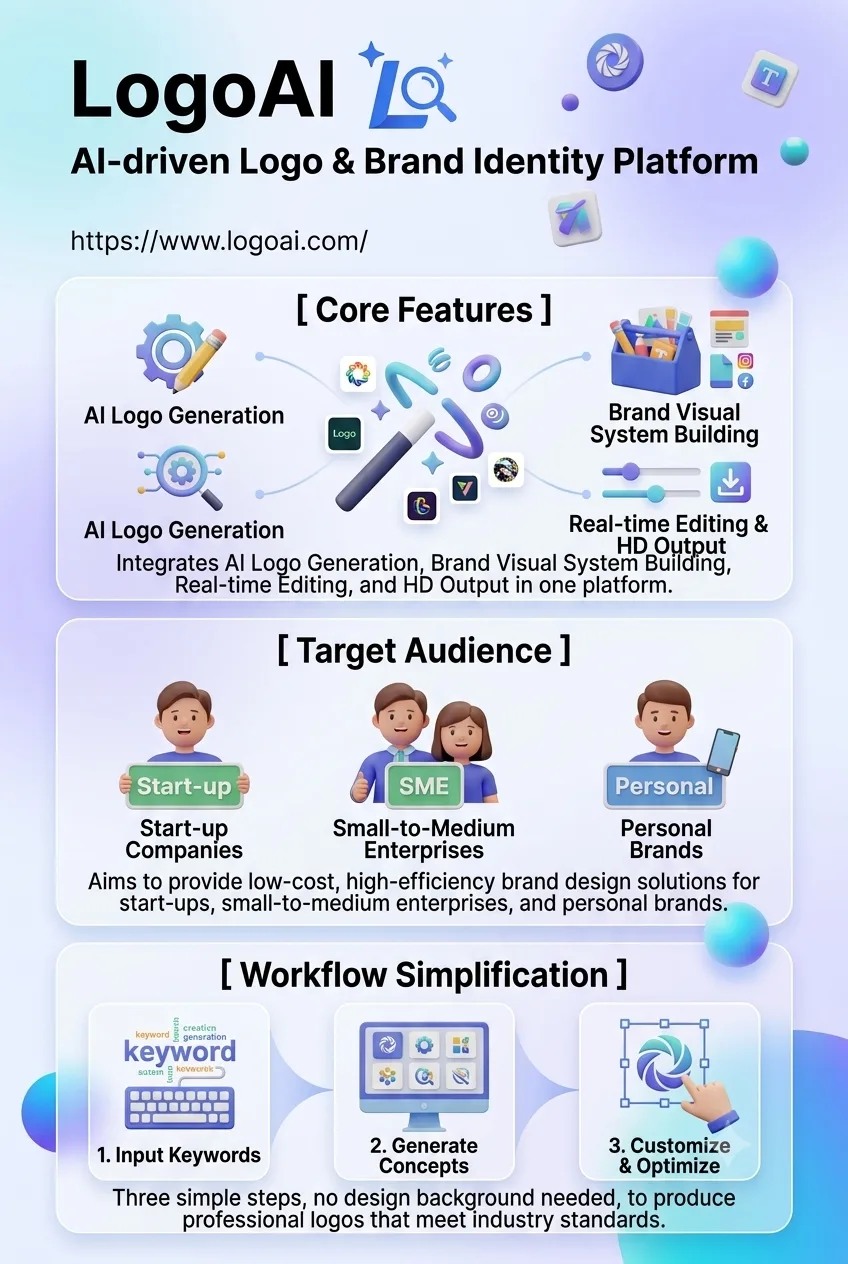
Enter a brand name and a short description, and the AI will generate a logo, color palette, fonts, and a complete set of brand assets.
Advertisement 728 × 90
CompanyLogoAI
CategoryAI Design
Released2022
Updated2026-08-20

LogoAI One picture says it all.

LogoAI

LogoAI Overview

LogoAI is more than just a logo generator.

Enter your brand name, industry, and a short description, and it will first generate a set of logo concepts. Once you choose one, the system can continue building out the rest of the identity, including brand colors, font pairings, business cards, social media covers, poster templates, and other assets.

So what LogoAI is really selling isn’t a single icon, but a ready-to-use visual brand system.

With LogoAI 2.0, launched in early 2026, the platform moved a step further.

The new Design Studio integrates multiple image and video models. When you generate promotional graphics, posters, or videos, it can automatically carry over the brand colors, fonts, and visual direction you’ve already established.

The biggest advantage is consistency.

You don’t have to remind the AI every time what colors, fonts, or style to use. Once the brand settings are defined, they can carry across future assets.

That makes LogoAI a good fit for people who need to build a brand quickly but don’t yet have the budget for a full design team.

LogoAI Pricing

PlanPriceDescription
Free $0 Lets you generate and preview logos. Download options and usage rights are limited, so it’s best for testing the results first.
Basic $25 - $29 one-time Includes basic digital logo files. Best suited for websites, profile images, and social media.
Pro $45 - $59 one-time Adds high-resolution PNG, SVG, PDF, and other file formats. Also includes brand color and font information.
Brand $65 - $99 one-time Includes everything in Pro, plus brand assets such as logo animations, business cards, social media templates, posters, and office templates.

LogoAI’s pricing is a little different from most design tools. It mainly uses a one-time purchase model rather than an ongoing monthly subscription.

You can generate and preview logos for free, then pay only when you’re ready to download the final files.

Pricing may vary by region and over time, so it’s best to check the current price shown on the official site before purchasing.

If you only need a profile image or a simple logo, Basic is usually enough.

If you need print-ready files, Pro is the better fit.

If you’re building a new brand from scratch, Brand offers much more value, because the real time savings come from the full set of follow-on brand assets, not just the logo file itself.

LogoAI Key Features

  1. AI brand visual generation
    Enter your brand name, industry, and a short description, and the AI will generate a logo, color palette, fonts, and a basic visual direction for the brand.
  2. Design Studio
    Create promotional assets using multiple image and video models while automatically carrying over your established brand colors and fonts.
  3. Brand kit
    Generate common brand assets such as business cards, social media covers, post templates, posters, presentations, and email signatures.
  4. Logo animation
    Some plans can turn a static logo into an MP4 or GIF animation for video intros and social media.
  5. Multi-format export
    Supports formats such as PNG, SVG, and PDF, making assets suitable for both digital use and later printing.
  6. Logo editing
    After generation, you can still adjust the font, colors, icon, and layout instead of being locked into the first result.
  7. Commercial use
    Paid plans include corresponding commercial usage rights for company websites, marketing materials, and brand promotion.

LogoAI Editorial Review

I ran through the full LogoAI workflow using a fictional brand.

There’s almost no learning curve

Enter the brand name, choose an industry, pick a few styles you like, and you can start generating right away.

If you only look at the logo-generation step, LogoAI doesn’t feel dramatically different from similar tools.

The real difference comes afterward.

Once you choose a logo, the system automatically extends it into brand colors, fonts, business cards, social media templates, and other assets.

That’s when LogoAI’s positioning becomes much clearer.

It isn’t just trying to solve “I need a logo.” It’s trying to handle a whole set of small design tasks that come with launching a brand.

The logos are solid; the brand kit is more useful

Looking at the logos alone, most of the results felt “directionally right and usable.”

They weren’t always especially impressive, but they also rarely went completely off track.

The real time savings come from the brand center.

Once the logo is set, colors, fonts, and social templates can all be generated quickly.

When you later create Instagram posts, Facebook assets, or posters, you don’t need to redefine the visual rules every time.

For an early-stage startup or personal brand, that’s much more useful than simply receiving a single SVG file.

A few practical issues

First, the creative ceiling for logos is limited.

A lot of the results feel like variations within established design conventions.

If you need something highly experimental or a truly distinctive brand symbol, LogoAI may not go far enough.

It’s better at quickly producing something that looks professional than replacing high-end brand design.

Second, Chinese brand names are less consistent than English ones.

Complex Chinese names can create problems with font selection and overall balance.

If the brand also has an English name, pinyin version, or abbreviation, the results are usually easier to stabilize.

Third, the free version is mainly for previewing.

Files that are actually useful for websites, print, and formal marketing generally need to be unlocked with a paid plan.

So the free version is better for testing a design direction than for long-term use.

Fourth, it’s worth double-checking before paying.

Refund policies for digital products are often strict.

It makes sense to review the logo, fonts, and layout carefully in the preview stage and only buy the final files once you’re satisfied.

Pros and cons

Pros

  • It goes beyond logo generation. The follow-on brand assets are the biggest difference from a typical logo tool.
  • One-time payment. Good for people who don’t want another recurring subscription.
  • Strong brand consistency. Colors, fonts, and later assets can all follow the same visual system.
  • Very easy to use. You can build a basic brand identity without knowing Illustrator.
  • Fast for launching. It can take you from a blank slate to a usable set of brand assets quickly.

Cons

  • Limited logo originality. It’s better at efficiently producing polished, conventional options than breakthrough visual ideas.
  • Chinese support is only average. Chinese brand names and font pairings can still be inconsistent.
  • Limited deep customization. Complex brand systems still need professional designers and design software.
  • The free version is mostly for previewing. Final files and higher-spec assets require payment.
  • Refund flexibility is limited. It’s worth checking everything carefully before purchase.

Best for / Not ideal for

Best for:

  • Founders and freelancers. Useful for building a complete-looking brand quickly on a limited budget.
  • E-commerce sellers. Good for keeping logos, storefront visuals, and social assets consistent.
  • Content creators. Helpful for quickly creating a visual system for a channel, podcast, or personal brand.
  • Small teams. A practical option when there’s no dedicated designer but consistent brand assets are still needed.

Not ideal for:

  • Mature brands that need highly original identity work. If brand recognition itself is a core asset, a professional design team is still the better choice.
  • Companies that need complex brand guidelines. LogoAI is better for the launch stage than for full-scale brand consulting.
  • Anyone with very high standards for Chinese typography. Chinese-language output still needs manual review and adjustment.
  • People who only need a simple profile image. There’s little reason to pay for a higher-tier package if you don’t need the broader brand system.


Summary

LogoAI is mainly aimed at users who want to lower the barrier to design while saving time and money.

  • Startups and solo founders
    People who need to build a professional-looking brand quickly but have limited budgets and design resources.
  • Small and mid-sized businesses or studios
    Teams that want to build a visual identity efficiently and keep their branding consistent across websites, social media, print, and other channels.
  • Non-designers
    Individuals or teams without professional design skills who still want to create and customize their own logos and brand assets.
  • Designers who need faster iteration
    Designers can use AI to quickly generate early logo concepts and directions, speeding up the initial design process.

Comments (0)

Leave a comment

Advertisement 728 × 90

Similar Tools