I used Gemini AI Studio for three things: writing a Python script to process CSV files, analyzing a product PDF, and generating a simple HTML game.
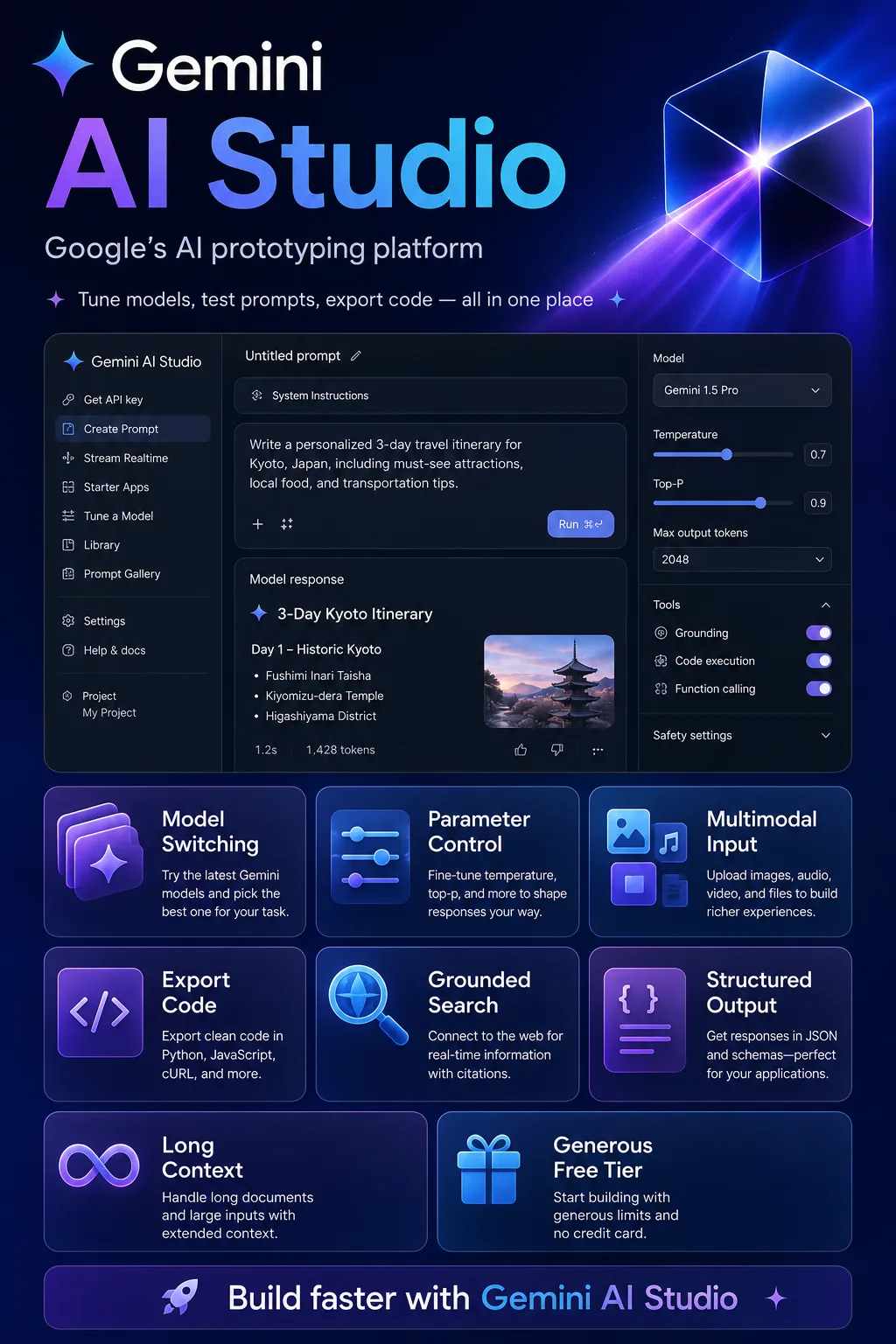
It really is quick to get started
Sign in, choose a model, enter a prompt, and hit Run.
The first time through, I barely needed a tutorial.
It doesn’t immediately force you to configure an API key, add a payment method, or install an SDK. If you just want to validate an idea, that makes the experience much smoother.
Gemini 3 Pro is very capable at generation
I used it to build a simple billiards game.
On the first attempt, the basic logic, interface, and interactions were already working.
It was obviously still far from a production-ready product, but for prototyping, it was more than enough.
The real time saving here isn’t just “writing code faster.”
It’s validating an idea faster.
Get code is my favorite step
I used AI Studio to tune a prompt for classifying customer feedback.
After three rounds of refinement, the output was stable enough. I clicked Get code, copied the Python example locally, added a few lines to read the CSV file, and had it running quickly.
Previously, I would usually need to go back to the docs to find the endpoint, parameter format, and authentication setup.
Now, a lot of that back-and-forth is gone.
Chinese output can still feel slightly awkward
Chinese is usable, but in professional content it sometimes simplifies terminology too much.
For example, a precise technical term may get rewritten into a more general everyday expression.
That’s fine for casual conversation, but in technical documentation, I still review it manually.
For complex tasks, I usually prefer writing the prompt in English and handling the Chinese output afterward.
You still can’t fully trust long-document analysis
I uploaded a PDF with more than 70 pages.
The overall summary was fine, but once it cited the wrong page number while sounding completely confident.
So even with very long context windows, I still verify important figures, quotes, and page references against the original document.
Access from mainland China is a real barrier
Google services already come with network limitations in mainland China.
If the connection is unstable, failed loads and interrupted sessions can seriously affect the experience.
For developers in China, that may be worth considering before the model quality itself.
Pros
The free tier is generous.
For learning, model testing, and prototyping, you can often work for quite a while without worrying about cost.
Very easy to start using.
You can test everything in the browser without setting up a full development environment first.
Strong model capabilities.
Code generation, multimodal tasks, and frontend generation can be better than expected.
Get code saves time.
Once the prompt works, you can move directly into SDK code.
The multimodal experience is mature.
Images, PDFs, audio, and video can all be handled directly.
It fits naturally into the Google ecosystem.
Moving from AI Studio to the Gemini API or Vertex AI is relatively straightforward.
Cons
The free tier’s data policy needs attention.
It isn’t the right place to casually upload sensitive business data or confidential files.
Real-time web access may require paid usage.
Products that depend on current information shouldn’t rely only on the free tier.
Chinese is less consistent than English.
Professional writing and technical terminology sometimes need manual cleanup.
Access from China can be inconvenient.
The network itself may become the biggest usability barrier.
Long context doesn’t eliminate hallucinations.
Being able to read a lot of content doesn’t mean every detail or citation will be correct.
Who it’s good for
AI application developers and founders
It’s excellent for quickly testing models, prompts, and product ideas before committing to full development.
People learning LLM development
The free tier is generous, and the interface makes it easy to experiment with parameters and multimodal capabilities.
Teams working with images, PDFs, and video
Gemini’s multimodal strengths are especially useful in these workflows.
Teams already using Google Cloud
Moving into the Gemini API or Vertex AI later is relatively seamless.
Who it’s not ideal for
Companies with very strict data privacy requirements
The free tier isn’t suitable for casually handling sensitive business data.
General users in mainland China
Network conditions can directly affect the experience.
High-concurrency production systems
AI Studio is better for testing and prototyping. For production at scale, paid API access or Vertex AI is more appropriate.
People who only want chat, writing, or translation
For those use cases, the regular Gemini web app is simpler.













Comments (0)