Midjourney

4.40
Just describe what you want, and it can generate a polished image.
Advertisement 728 × 90
CompanyMidjourney
CategoryAI Image
Released2022-03
Updated2026-08-18

Midjourney One picture says it all.

Midjourney

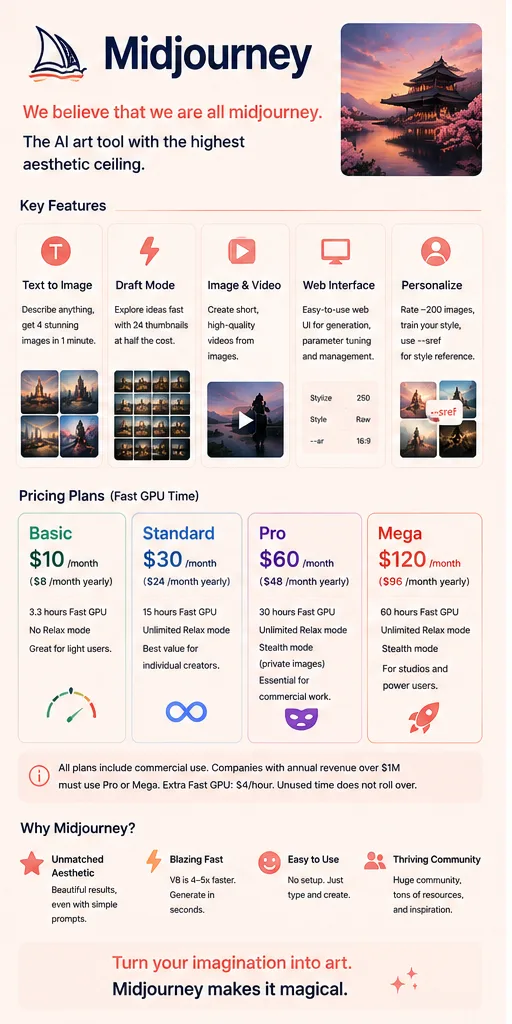
Midjourney Overview

Midjourney is very simple to use:
describe what you want to see, and it generates it for you.

For example, type:

“A Shiba Inu in a spacesuit standing on Mars, with cinematic lighting.”

Within moments, you’ll get several different versions. From there, you can upscale the one you like, make adjustments, or generate more variations.

What really made Midjourney stand out, though, is its aesthetic quality.

Tools like Stable Diffusion give users more control over models, parameters, and workflows.

Midjourney takes a different approach: it hides much of that complexity and tries to produce polished-looking images even from relatively simple prompts.

That sense that Midjourney has a kind of “built-in taste” has always been a big part of its identity.

By 2026, it’s also clearly moving beyond being just an image generator and toward becoming a more complete creative tool.

Midjourney Pricing

PlanPriceDescription
Basic $10/mo 3.3 hours of Fast GPU time, without unlimited Relax Mode. Best for light use.
Standard $30/mo 15 hours of Fast GPU time, plus unlimited Relax Mode. A good fit for most individual creators.
Pro $60/mo 30 hours of Fast GPU time, unlimited Relax Mode, and Stealth Mode for keeping your generations private.
Mega $120/mo 60 hours of Fast GPU time, unlimited Relax Mode, and Stealth Mode. Best for high-volume creators and studios.

All plans include commercial usage rights. However, companies with more than $1 million in annual revenue are required to use the Pro or Mega plan.

Additional Fast GPU time can be purchased separately, but unused GPU time does not roll over to the next month.

Basic is mainly for trying Midjourney out.
Standard is enough for most individual creators.
The biggest difference with Pro is Stealth Mode, which makes it a better fit for commercial projects where you don’t want your work to be public.
Mega is designed for heavy users and studios that need to generate large volumes of images on an ongoing basis.

Midjourney Key Features

  1. Text-to-image generation
    Describe what you want in natural language, and Midjourney generates several options. From there, you can upscale your favorite, create variations, or refine the prompt and try again.
  2. Draft Mode
    Designed for quickly exploring creative directions. You can use rough, conversational prompts to generate lots of early concepts, then pick the strongest ones to refine further.
  3. Image and video generation
    Midjourney is expanding beyond still images into video. Existing images can also be used as a starting point to create motion and animated results.
  4. Web-based workflow
    Midjourney originally relied heavily on Discord, but much of the everyday workflow can now be handled on the web — including generation, parameter adjustments, image management, and search.
  5. Personalization and style control
    Midjourney can learn your visual preferences based on the images you like. Features such as --sref also let you use style references to push results toward a specific visual direction.


Midjourney Editorial Review

I’ve been using Midjourney since V6, and the biggest change in V8 is pretty simple: it’s faster, and it follows instructions better.

Ease of use: very low friction.

These days, you can just log in on the web and start generating. There’s no need to install models, set up a GPU, or configure a local environment.

You type what you want, wait for the results, choose an image, and keep refining from there.

Chinese prompts work too, although for more complicated requests, English still tends to be more reliable.

What the results are like:

V8 is noticeably faster than earlier versions, and it does a better job of following small details in a prompt.

For example, I used to ask for:

“A cat wearing a straw hat with a red ribbon tied around the hat.”

Older versions would sometimes put the hat next to the cat instead.

V8 is much better at understanding those relationships between objects, positions, and attributes.

The image quality is also more solid overall. For concept art, moodboards, and visual pitches, Midjourney still produces very polished results with relatively little effort.

A few issues stood out in practice:

  1. It’s more reliable, but a little less surprising
    V8 is more accurate and more professional-looking, but some of the randomness that longtime users liked is weaker. V6 would occasionally produce something completely unexpected but strangely compelling. V8 feels more controlled.
  2. Old prompts don’t always carry over well
    Major version updates can change how parameters, prompts, and style techniques behave. Longtime users may need to relearn parts of their workflow, which is a real cost.
  3. Mode support can change between versions
    During testing periods for new models, some generation modes or plan-related features may be adjusted temporarily. Heavy users should also keep an eye on actual Fast GPU usage.
  4. Text is still a weak spot
    Short English words have improved, but longer English text and Chinese typography still make mistakes. If a poster needs exact copy, you’ll usually need to fix the text afterward.

What works well

  • High default visual quality. You don’t need elaborate prompts to get something that looks polished enough to use or refine.
  • Low learning curve. There’s no need to understand models, nodes, samplers, or other technical concepts.
  • Fast generation. Great for exploring directions quickly and producing lots of ideas.
  • Mature community. There are plenty of tutorials, examples, style references, and prompt resources.

What doesn’t work as well

  • Precise control is still limited. It handles overall mood very well, but details like poses, object counts, and exact positioning can still drift.
  • Version upgrades can change the feel. Existing prompts and habits don’t always transfer cleanly to new models.
  • Commercial copyright remains uncertain. Eligible paid users can use generated work commercially under Midjourney’s terms, but broader questions around AI training data and copyright are still disputed.
  • There’s no real long-term free tier. If you want to keep using it, you’ll basically need a paid plan.

Best for

Designers and visual creators

Great for concept art, style exploration, and mood references.

Marketing, planning, and content teams

Useful for social visuals, campaign concepts, and early-stage creative drafts.

Users without a technical background

You can start by typing a prompt without learning a complex workflow.

Work where visual impact matters more than absolute precision

For example, game concepts, film storyboards, and personal art projects.

Not ideal for

Commercial work that requires precise control

Product imagery, consistent characters, or strict composition usually still need other tools in the workflow.

Heavy users on a tight budget

At $30 per month, Standard isn’t especially cheap for someone using it purely for fun.

People who want a stable workflow for years

Midjourney evolves quickly, and new versions can change both prompt behavior and generation habits.


Summary

Midjourney is still highly competitive, and the reason is pretty simple:

it lets ordinary users create polished-looking images without much of a learning curve.

V8 makes it faster, more accurate, and more like a mature production tool.

The trade-off is that some of the unpredictability that made earlier versions feel exciting has faded a little. Those occasional “wrong but surprisingly good” results happen less often.

If what you need is concept art, visual inspiration, or polished creative assets, Midjourney is still one of the easiest tools to pick up.

Just don’t think of it as Photoshop.

Midjourney is great at helping you find a visually strong direction. It’s much less suited to controlling every single pixel exactly the way you want.

The hands-on sections of this article are based on Midjourney V8 Alpha and publicly available information as of August 2026. Pricing and specific features are subject to the latest official information.

Comments (0)

Leave a comment

Advertisement 728 × 90

Similar Tools